The Basic Computer Course is where students start who have not used a computer much, or at all. It runs one month as a certificate course and twelve months as a diploma, and it assumes nothing.
In brief: the Basic Computer Course runs as a one-month certificate or a twelve-month diploma, with the fee shared on enquiry, covering MS Word, MS Excel, MS PowerPoint and internet and email use. It’s taught in classroom and online formats and is designed for complete beginners.
What is the Basic Computer Course?
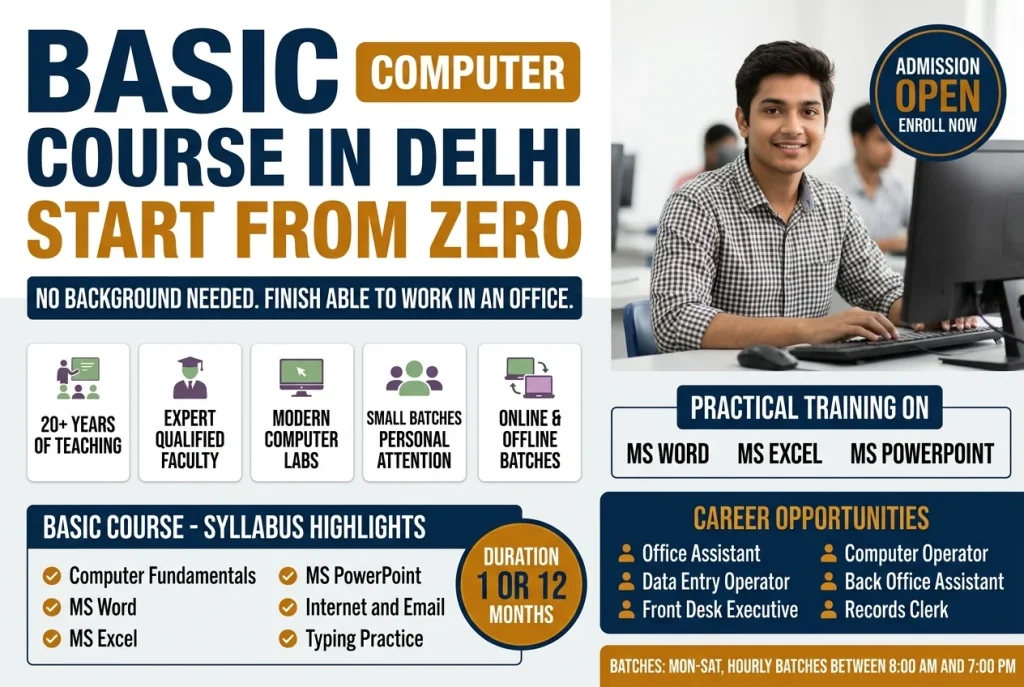
The course covers computer fundamentals, how to operate a PC and use essential software, then works through the applications that daily office and personal work actually require:
- MS Word, creating, formatting and editing documents.
- MS Excel, data entry, formulas and charts.
- MS PowerPoint — building presentations with text, images and animations.
- Internet and email, using the web and managing correspondence.
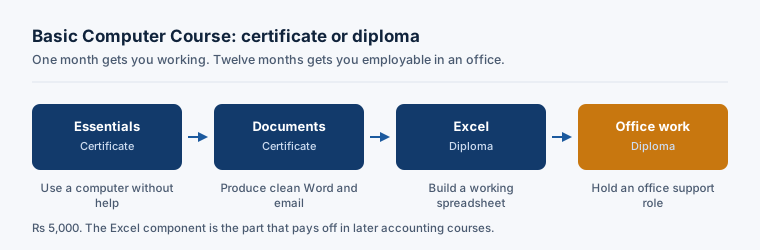
The one-month certificate covers the essentials. The twelve-month diploma goes considerably further and is intended for students who want computing itself as their qualification rather than as a supporting skill.
Who should do this course?
The course is designed for beginners and for anyone with minimal exposure to computers. There is no assumed background, and no prior qualification is treated as necessary to follow the material.
Many students take it alongside or before an accounting course, which is a sensible order. Excel in particular makes every later accounting subject easier, and struggling with the computer while also learning accounting makes both harder than they need to be.
Certification and examination
The institute conducts an online multiple-choice examination through its portal and awards a certificate on completion.
Fee and what it covers
The Basic Computer Course fee is not published on this page; the institute shares it on enquiry, along with what it includes.
Why study at NIMB
Teaching is practical and hands-on, in classroom or online mode, and the course sits alongside the institute’s accounting programmes — so if you continue into Tally or financial accounting afterwards, the progression is planned rather than accidental.
How the course is taught
The course assumes nothing. It begins with computer fundamentals, how to operate a PC and use essential software. It then works through the applications daily office work actually requires: MS Word for creating, formatting and editing documents; MS Excel for data entry, formulas and charts; MS PowerPoint for presentations; and the internet and email. The one-month certificate covers the essentials. The twelve-month diploma goes considerably further and suits students who want computing itself as their qualification.
Classes run in both classroom and online mode, so the course can be taken alongside a job. Assessment is an online examination through the institute’s own portal: multiple choice questions, one hour. Students who pass receive the certificate or diploma for the course.
Career opportunities after this course
Basic computer skills are a baseline requirement for most office work rather than a qualification in themselves. These are the roles the course opens, and the routes it leads into.
Data Entry Operator
Entering and maintaining records accurately and at reasonable speed. The most direct destination from this course, and widely available across sectors.
Front Office or Admin Executive
Reception, correspondence, scheduling and record-keeping. Requires comfort with Word, email and basic spreadsheets, which is exactly what the course covers.
Office Assistant
General administrative support, documents, filing, correspondence and basic reporting. Common first employment for students who have not yet specialised.
Billing Assistant
Preparing invoices and maintaining billing records, usually in Excel or a billing package. The Excel component of the course is the relevant part.
Foundation for accounting roles
Not a job title, but worth stating plainly: most students here continue into accounting. The Excel work in particular carries into every accounting course that follows, and starting here makes those courses considerably easier.
Pay for these roles is set by local market rates, the employer you join and the practical skills you can actually demonstrate, not by the course itself. We avoid quoting salary numbers we can’t stand behind, so put that question to the institute directly.
Certificate or diploma: which one
Both routes appear on this page and the difference is not obvious from the names, so it is worth being direct about it.
The one-month certificate is a working introduction. It covers the fundamentals of operating a PC and the four things most office work actually requires: Word for documents, Excel for data and formulas, PowerPoint for presentations, and the internet and email. At the end you can use a computer competently for everyday tasks. For a student heading into accounting, that is usually all that is needed before moving on to Tally.
The twelve-month diploma is a different proposition. It is for students who want computing itself as their qualification rather than as a supporting skill — the person whose next job title will have “computer” or “data” in it, rather than “accounts”. Ask the institute what the current diploma syllabus covers before enrolling, because it is revised more often than the certificate and we would rather you check than take a list from a web page.
The honest test: if you are learning computers in order to do something else, take the certificate. If computing is the destination, take the diploma.
What “starting from zero” actually means here
A fair number of students arrive having genuinely never used a computer, and worry that a one-month course assumes otherwise. It does not.
The course begins with the machine itself — switching it on, the desktop, files and folders, saving and finding things again. That sounds trivial to anyone who has used a computer for years. It is not trivial if you have not, and skipping it is why self-teaching from videos so often stalls.
What tends to take longest is not any single application but the mental model underneath them. That model is understanding that a file exists in a place, that a document is separate from the program that opens it, that the same operation works the same way across programs. Once that lands, Word and Excel stop feeling like two unrelated things to memorise.
Excel is the part that pays off later
If you are taking this course as a step toward accounting, the Excel component is the one to take seriously.
Almost every accounting task you meet afterwards touches a spreadsheet. Reconciling a purchase register against GSTR-2B, checking a payroll run, comparing a Tally report against a bank statement — these happen in Excel before they happen anywhere else. Students who arrive at the Tally course or the Diploma in Financial Accounting already comfortable with formulas and cell references move noticeably faster than those who are learning both at once.
That is the practical argument for doing this course first rather than alongside: one month here removes a persistent handicap from everything that follows.
Where to go after this course
Most students here continue into accounting. The usual next step is the Tally Course, which takes one month and teaches the software Indian businesses actually keep their books in — the Excel skills from this course carry directly into it.
From there, the GST Practitioner Course covers return filing, and the Diploma in Financial Accounting covers the complete accounting job over twelve months. If you would rather stay with computing itself, the twelve-month diploma version of this course goes considerably further than the certificate.
How to enrol in the Basic Computer Course
Admission runs through a short conversation rather than an entrance test. Call the institute on 9212008787, or visit the centre at E-56, Laxmi Nagar, Delhi 110092, and an advisor will confirm whether the certificate or diploma route suits you, take you through the current batch timings, and explain what the course covers in practice.
Planning to move into accounting afterwards? Accounting without a commerce background sets out the route.
What you can do after each module
The certificate course breaks into five blocks, each building toward a specific, usable skill rather than familiarity with a topic.
| Module | What it covers | What you can do afterward |
|---|---|---|
| 1. Computer fundamentals | Switching on, the desktop, files and folders, saving and retrieving work | Find your way around a Windows PC without help and manage your own files |
| 2. MS Word | Creating, formatting and editing documents | Produce a properly formatted letter, resume or report from scratch |
| 3. MS Excel | Data entry, formulas and charts | Build a spreadsheet with working formulas and a chart, the skill every later accounting course assumes you already have |
| 4. MS PowerPoint | Presentations with text, images and animations | Put together a presentation deck without asking someone else to do it |
| 5. Internet and email | Using the web, managing correspondence | Handle everyday online tasks and professional email independently |
The twelve-month diploma continues well beyond this list. Ask the institute for the current diploma syllabus before enrolling, since it changes more often than the certificate content does.
Who this course is not for
This course is not for someone who already uses Word, Excel and email comfortably and just wants a certificate to prove it; that is a wasted month, and the Tally Course is a better use of the time. It is also not the right choice for someone who wants job-ready accounting skills specifically, since this course teaches general office computing rather than bookkeeping; go straight to Tally or the Diploma in Financial Accounting instead. And if you want the twelve-month diploma purely to pad a resume rather than to work in computing or data roles, the certificate followed by a specialist course usually makes better use of a year.
A realistic month on the certificate course
Expect the earliest sessions to cover the computer itself, since everything after depends on it. After that comes a shift into Word for a stretch, then Excel, which tends to take longest because formulas are new territory for most beginners, then PowerPoint and email toward the end. Practice matters more than attendance alone: students who type and build spreadsheets between sessions progress faster than those who only watch demonstrations.
Is this course enough on its own?
Finishing this course answers whether you can use a computer, not whether you are employable in accounts. Is a Tally course enough to get a job? is written about the next course rather than this one, but the honest answer applies here too: basic computer skills are a baseline, not a differentiator, and most students need this plus at least Tally before a job title changes.
The terms you will be working with
If you are starting from zero, the words are the first obstacle. These four come up constantly and are rarely explained.
An operating system is the software that manages a computer’s hardware and runs everything else on it. Windows is one.
A spreadsheet is a grid of cells holding numbers, text and formulas, used to organise data and calculate from it. Excel is the one offices use.
A formula is an instruction in a cell that computes its value from other cells, so the answer updates on its own when the inputs change. This is the whole reason a spreadsheet beats a calculator.
A pivot table is a summary built from a larger table, grouping and totalling the rows without altering them. It is the single Excel skill that most changes what an office job can ask of you.
More questions about the Basic Computer Course
Can I do this while working a job?
Yes, if you already have a job elsewhere. Classes run in classroom and online formats, and the one-month length is short enough that most working students fit it around a full-time schedule without much disruption.
What if I miss a class?
Because the course moves quickly, missing a session on Excel or Word means catching up on that block before the next one, since PowerPoint and email build on the same file-handling basics taught earlier. Check with your advisor at enrolment about how make-up sessions work for your batch.
What computer do I need at home?
A basic Windows laptop or desktop with MS Office installed is enough to practise between classes. You don’t need anything specialised for this course, which is part of the point of taking it first.
Is the certificate recognised?
The certificate is awarded and recognised by the institute on completion of its assessment. It documents that you have finished the coursework and passed the exam. It is not a government IT qualification, and for most students here it is a stepping stone toward Tally or an accounting diploma rather than a destination certificate in itself.